Debifi Vault: how Bitcoin Vault works

Debifi Vault is a non-custodial Bitcoin vault designed to help you securely store and manage your Bitcoin while keeping control of your funds.
What is a Bitcoin vault?
A Bitcoin vault is a secure way to store and manage Bitcoin while adding extra protection against losing or compromising a single private key. Unlike a regular Bitcoin wallet, a multisignature vault can require multiple keys to authorize a transaction. This means that one lost, stolen, or compromised key is not enough to move the Bitcoin. A vault can be used for long-term storage while still allowing you to receive, send, and manage your BTC when needed.
Is Bitcoin vault safe?
When choosing where to store your Bitcoin, the main question is about safety and how your funds are protected: “is Bitcoin vault safe where my Bitcoin would be stored”?
So, is Debifi Bitcoin Vault safe? How does the Debifi Vault protect your Bitcoin? The Debifi Vault uses a 2-of-3 multisignature setup, which means that two out of three keys are required to authorize a transaction. No single key can move your Bitcoin on its own.
The three keys are:
App key — stored on your mobile device in the Debifi app.
Hardware wallet key — stored on your supported hardware wallet. (During vault setup, you connect a supported hardware wallet and add its public key to the vault.)
Debifi backup key — securely stored by Debifi.
Debifi cannot use the backup key on its own to move your Bitcoin. It is one of the three keys in the 2-of-3 setup and is used as part of specific processes, such as recovery.
This setup means that losing or compromising one key does not automatically give someone control over your Bitcoin. It also gives you a recovery option if you lose access to one of your keys.
Debifi Vault currently supports Trezor hardware wallets. Support for BitBox is coming soon - already in Q4!
Moreover, you will create a secret phrase during the setup of your Debifi Vault. You need to keep it safe and remember it, as it is required to verify your identity during the Vault recovery process. This secret phrase will be also stored securely by Debifi and used strictly for the verification.
How to create the Debifi Vault?
Learn how to set up your Debifi Vault in our separate step-by-step guide.
What can you do with a Debifi Bitcoin Vault?
Your Bitcoin vault is designed for secure long-term storage and everyday management of your BTC.
You can use it to:
- receive Bitcoin
- store your Bitcoin
- send Bitcoin
- use your Bitcoin as collateral for a Debifi loan
You can also
- view your transaction history
- check balances
The Vault is designed to keep your Bitcoin under your control while adding an extra layer of protection through multisignature security.
How Bitcoin vault works
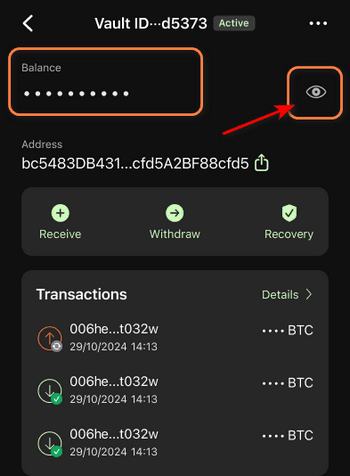
To hide your balance, click the eye icon:
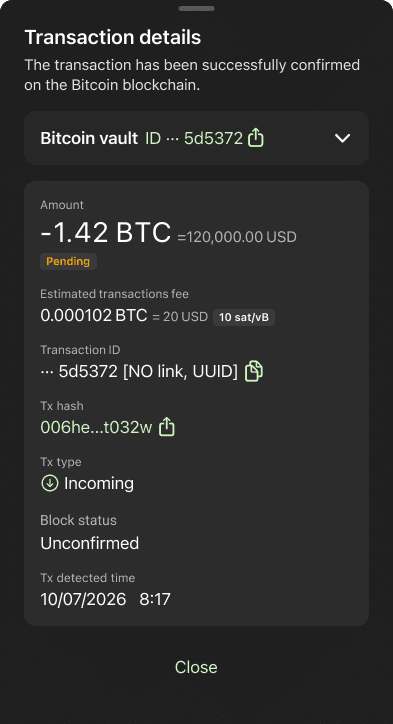
Click a transaction to view its details. Click “Close” to return to your vault:
How do you receive Bitcoin?
You can receive Bitcoin directly into your Debifi Vault.
Open your Vault in the Debifi app and use your receiving address to send BTC to the Vault. Click the “Receive”-button to see your address and QR code.
One vault means one constant Bitcoin address.
Once the transaction is confirmed on the Bitcoin network, the BTC becomes available in your vault.
How do you store Bitcoin in the Vault?
Once your Bitcoin is in the vault, it is protected by the 2-of-3 multisignature setup.
Your BTC is not controlled by a single private key. Instead, two of the three keys are required to authorize a transaction. This reduces the risk associated with losing or compromising a single key.
You can keep Bitcoin in your vault for as long as you want and manage it through the Debifi app.
How to send Bitcoin from your Vault?
You can send bitcoin from your vault to another Bitcoin address.
To send bitcoin, click the “Withdraw” button.
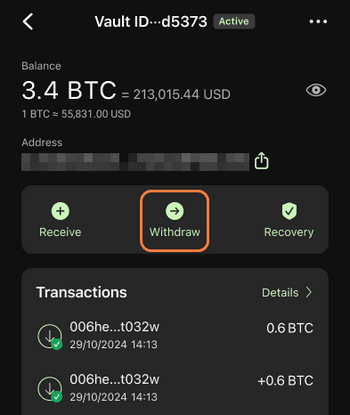
In the next step enter the destination address and amount, choose the currency and click “Continue”:
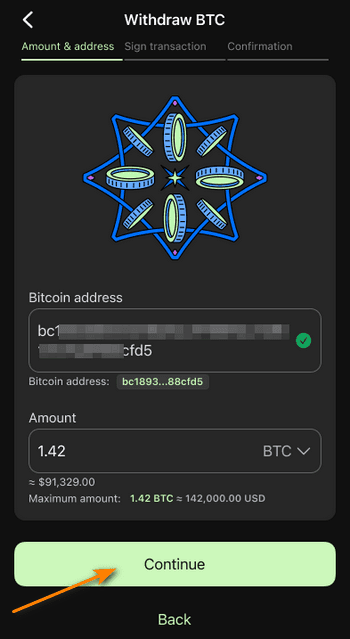
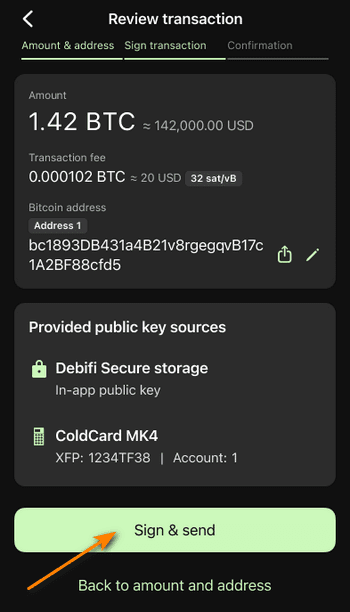
Follow the signing process. Because the vault uses 2-of-3 multisignature security, two keys are required to authorize the transaction. Sign the transaction by clicking “Sign & send” to send BTC.
How to recover the Vault if one of the keys is lost?
Because the Vault uses a 2-of-3 setup, losing one key does not automatically mean losing your Bitcoin.
If you lose access to your hardware wallet or phone, you can use the Vault recovery process.
For example, if you lose your hardware wallet but still have your app key and secret phrase, you can start the recovery process in the Debifi app and move your Bitcoin to a new BTC address.
The recovery process includes a security review, transaction signing, and a mandatory seven-day security delay before the recovery transaction can be completed.
If you lose access to your phone, a separate recovery process is available through Debifi support. If you lose access to both your hardware wallet and your app key, you will no longer be able to restore your vault.
If you have forgotten or lost your secret phrase, unfortunately, you will not be able to recover your vault. The secret phrase is an essential part of the recovery process if you have lost one of your keys. You should always keep your secret phrase secure.
Find more about the recovery function in our article: How to recover your Debifi Bitcoin Vault
How to close the Debifi Vault?
To close your Debifi Vault you need to send all BTC amounts to another Bitcoin address so that your Vault balance is zero.
To close the Vault, click the three dots in the upper-right corner and then select “Close vault”:
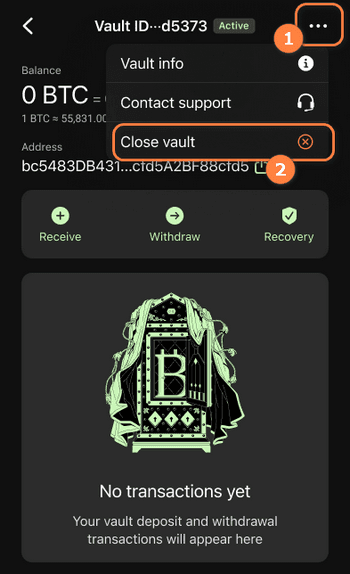
Enter your PIN to confirm. Your Vault is now closed.