
How to recover your Debifi Bitcoin Vault

Losing access to your Debifi app (for example, if you lose your mobile phone) or hardware wallet does not necessarily mean losing access to your Bitcoin. Debifi has thought over such a situation and provided the recovery function for your Debifi Bitcoin Vault.
During the setup of your Debifi Vault you have created the secret phrase which is essential for the recovery.
Debifi Vault uses a 2-of-3 multisignature architecture with three keys. Two of the three keys are required to authorize a transaction.
-
Key 1: stored locally in the Debifi app on your phone
-
Key 2: stored on your hardware wallet
-
Key 3: generated and stored by Debifi as a backup key
The recovery process requires your remaining key and secret phrase for verification. Let’s see how this process works.
When do you need to recover your Vault?
You may need to start the access-recovery process if you lose access to one of the keys associated with your vault.
This can happen if:
- you lose your phone and cannot access the Debifi app;
- your phone is damaged and the local app key is no longer available;
- you lose your hardware wallet;
- your hardware wallet is damaged or inaccessible.
If you lose your phone, contact Debifi support to begin an access-recovery request. If your hardware wallet is lost or damaged, you can start the recovery process right from the Debifi app. Check the detailed guide below.
How Debifi Vault recovery works: step-by-step instructions
There are 2 ways to start the recovery process depending on which key you have lost.
If you still have access to your mobile device,
- Open Debifi app.
- Click on “Recovery” inside your vault:
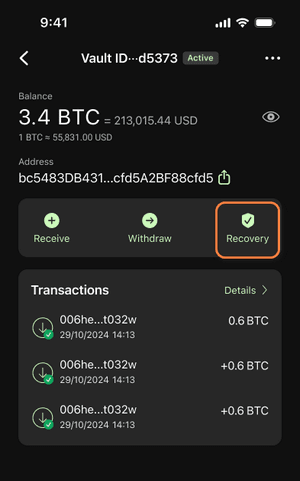
- In the next window you will get the main information about vault recovery. Click on “Start recovery”.
- Put your secret phrase in the next step and request recovery.
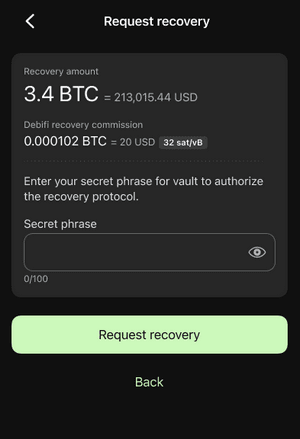
- After your secret phrase is verified, your recovery request will be reviewed by the Debifi support team.
If you have lost your mobile device or access to the Debifi app,
- Create new vault
- Contact Debifi support under [email protected] to begin an access-recovery request and provide your secret phrase that you have set up during your vault creation for verification as well as the address to which your bitcoin should be transferred during the recovery.
- Then the review process will start.
NOTE: If you forgot your secret phrase, you cannot recover your vault through the recovery process.
Review process
Debifi support will verify your recovery request. The review process will take some time.
Once the verification is successfully completed, a recovery transaction is created using the Bitcoin address you provide through email or in the Debifi app. The transaction is then signed as part of the recovery process.
Then the recovery request enters the mandatory security waiting period. This mandatory seven-day security delay adds an additional layer of protection against unauthorized recovery requests.
This means that access recovery is not immediate. You should allow seven days for the security delay after the transaction is signed before the recovery transaction can be completed.
Moving BTC to another address
For recovery, you need to have your remaining key available.
Which key is this, depends on what you have lost:
- If you lose access to your phone, your hardware wallet key remains available.
- If you lose your hardware wallet, your Debifi app key remains available.
If you lose both of the keys, the recovery will not be possible.
Your left key will be needed to sign the transaction for sending BTC from your old vault to the provided BTC address confirmed in your account.
Transaction signing depends on which key was lost:
-
If the phone was lost (Key 1 lost): the transaction is sent to you via email, and you should sign it with your hardware wallet key
-
If the hardware wallet was lost (Key 2 lost): the transaction is signed manually on your account via the Debifi app:
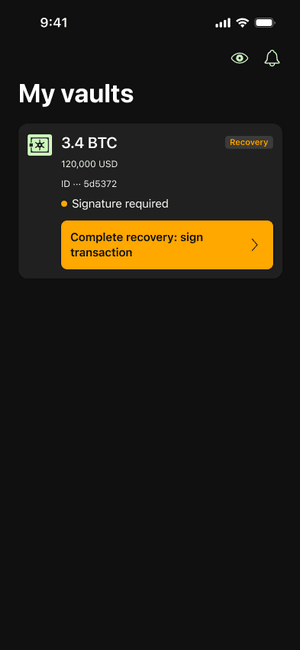
Transactions are automatically signed by Debifi after 7 days of providing user signatures.
Once the mandatory seven-day security delay has passed, Debifi can use its backup key to help complete the recovery transaction.
The backup key is the third key in your vault's 2-of-3 multisignature setup. Together with your remaining key, it provides the two keys required to authorize the recovery transaction.
All the BTC amount from the old vault will be transferred to the provided BTC address.
Important things to remember
Your Debifi Vault is designed so that no single key is sufficient to authorize a Bitcoin transaction.
However, your ability to recover access depends on keeping the information and keys required for recovery available.
Remember these three things:
1. Keep your secret phrase safe.
It is required for recovery verification.
2. Keep access to at least one of your keys.
The remaining key is required for the standard access-recovery process and signing the transfer transaction.
3. Contact Debifi support if you lose your phone or hardware wallet.
The recovery process includes verification and a mandatory seven-day security delay before the Debifi backup key can be used to help complete the recovery transaction.
Recovery is designed to provide an additional path back to your vault without giving Debifi unilateral control over your Bitcoin.