
How to set up Debifi Bitcoin Vault

Debifi Vault is a non-custodial Bitcoin vault with a 2-of-3 multisignature architecture. It is designed to give you greater control over your Bitcoin while protecting your funds against the loss or compromise of a single key.
You can set up your Debifi Bitcoin Vault in several steps.
Before you start
Mandatory you need to create a Debifi account before setting up the vault if you don't already have one.
Before creating your Debifi Vault, make sure you have:
- the Debifi mobile app installed on your phone
- a Debifi account
- a supported hardware wallet
Step-by-step Vault setup
Your Vault setup is available in the Debifi app.
-
Open the Debifi app on your mobile device.
-
Make sure you are logged in to your account.
-
Choose the Vault option in the menu at the bottom of the screen:

-
In the next step you need to generate your keys:
A-Add hardware wallet key
Connect your supported hardware wallet to the setup process in the Debifi app. You can use Trezor, support of BitBox comes next. Select your hardware wallet to import its public key (XPUB). This registers the device as a co-signer for your vault.
Once the hardware wallet key has been successfully linked to your vault draft, click the button "Continue setup”.
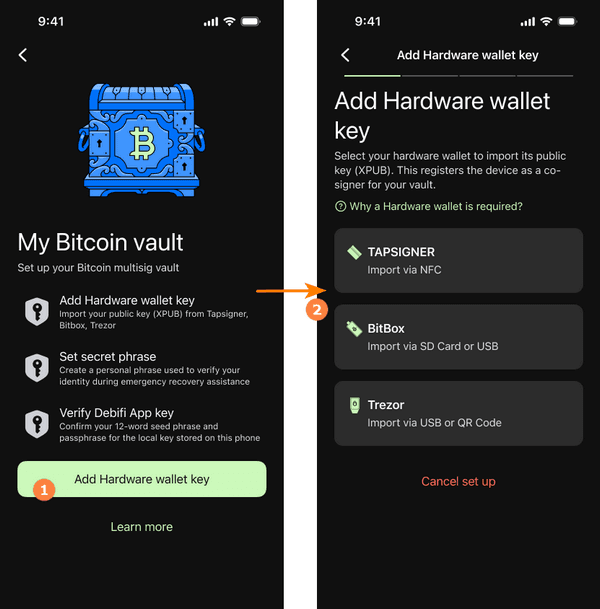 If you want to use another hardware wallet, you should reset the current setup and start again.
B - Set up your secret phrase in the next window.
The secret phrase is a unique identifier associated with your vault. It is used only for identity verification during the vault recovery process. If you ever lose access to the Debifi app or your hardware wallet, Debifi support will strictly require this exact phrase to authorize the recovery process.
You choose yourself what will be your secret phrase. There are no specific requirements for what this phrase should be. Write down your secret phrase and keep it in a safe place, there is no way to recover the phrase later if you forget or lose it.
For more information, visit debifi.com/faq
- Here is the guide How to recover the Debifi Bitcoin Vault
С - Verify and backup your seed phrase.
Next, verify your Debifi App key to secure your multisignature setup and activate your vault. To do this, confirm your 24-word seed phrase for the local key stored on your phone. Put a PIN code as confirmation.
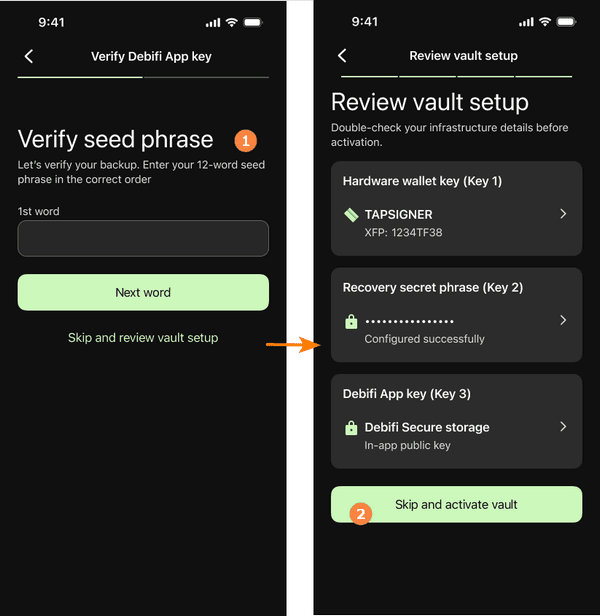
5.Once the setup is successfully completed, your Debifi Vault is ready to use. Now you can use your Debifi Vault to receive and store BTC and manage your Bitcoin through the Debifi app.
You can find your vault information by clicking on 3 dots in the upper right.
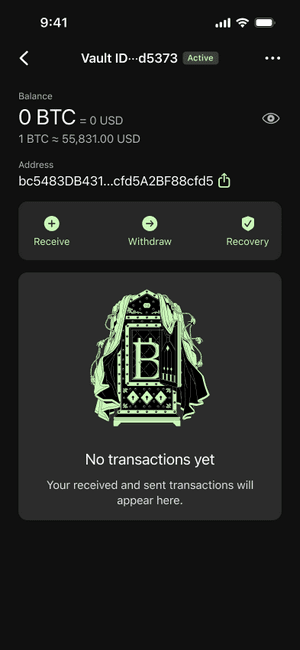
Your Debifi Bitcoin Vault now has three keys:
Key 1: stored in the Debifi app
Key 2: from your hardware wallet
Key 3: generated by the Debifi server as a backup key
Your vault uses three independent keys. Any two of the three keys are required to authorize a transaction. This means that no single key holder, including Debifi, can move your Bitcoin independently.
Your Debifi Vault in Four Steps:
How to create Bitcoin vault wallet
The setup can be summarized in four main steps:
- Go to the Debifi app
Create your Debifi account in the mobile app. - Generate your keys
Connect your hardware wallet and generate the keys required for your 2-of-3 multisignature vault. - Set up your secret phrase
Create your unique secret phrase. You will need the exact phrase for identity verification during vault recovery. - Your vault is ready to use
Complete the setup and start using your Debifi Bitcoin Vault to receive, store, and manage Bitcoin.