
Debifi Vault: What happens if I lose my hardware wallet?
If your bitcoin is stored in a Debifi Vault, your funds are under the protection of 2-of-3 multisig wallet.
Losing your hardware wallet does not automatically mean losing access to Bitcoin in your Debifi Vault. Because Debifi Vault includes a recovery function that allows you to recover your funds if you lose access to one of your keys.
⚠️ NOTE: In the first stage of launching Debifi Vault the recovery function will work only if you contact our support. Later it will be also implemented in the app.
So, if you have lost your hardware wallet, please write to [email protected]. You will need your secret phrase set up during creation of the Debifi Vault. Then our team will give you all the instructions.
The following instruction describes the full release.
Your Debifi Vault uses a 2-of-3 multisignature setup with three keys:
Key 1 is stored in the Debifi app on your mobile device.
Key 2 is stored on your hardware wallet.
Key 3 is a backup key stored by Debifi.
When you lose your hardware wallet, your app key is still available on your mobile device.
Your app key is one of the two keys you need to recover access to your vault. Keep access to your phone and do not delete the Debifi app unless instructed by Debifi support during the recovery process.
Because the Vault requires two of the three keys to authorize a transaction, one lost key alone is not enough to move your bitcoin. This is where the third key stored by Debifi comes into play.
If you lose your hardware wallet, you can start the access-recovery process with your remaining app key and your secret phrase that you have set up during creation of your Vault.
What should I do if I lose my hardware wallet?
If your hardware wallet is lost, stolen, damaged, or you can no longer access it, you can immediately start an access-recovery request directly in the Debifi app. During this recovery process you can move your bitcoin from the old vault to another BTC address.
You will need:
- access to your Debifi app and your remaining app key
- your secret phrase
Note: if you cannot access your key stored in the Debifi app the recovery process will not be possible.
! Do not share your secret phrase or other recovery information with anyone except through the official Debifi recovery process.
Recovery process: step-by-step instructions
The recovery process has several steps.
1.Open the Debifi app and go to your Vault.
You can start the recovery process right away: Click on “Recovery” on the vault’s main screen.
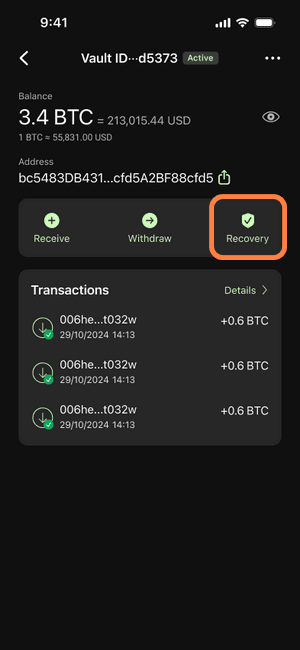
You will see the main information about the Vault recovery process. Click “Start recovery”.
2.Enter your secret phrase that you set up when creating your Vault in the next step, then request recovery.
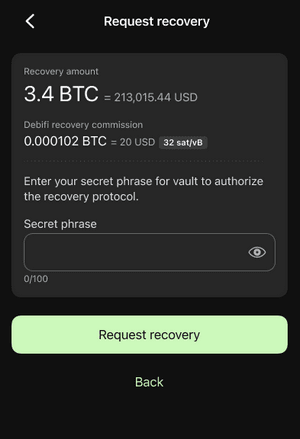
- Your secret phrase is required as part of the recovery verification process.
- You must provide the same secret phrase that you created when setting up your Vault.
- If you have forgotten or lost your secret phrase, the recovery process cannot be completed.
Important: Your secret phrase is sensitive recovery information. Keep it private and store it securely.
3.After your secret phrase is verified, your recovery request will be reviewed by the Debifi support team.
4.Once the Debifi team has reviewed your request and verified the secret phrase you have provided, the recovery process can move forward. You should provide a new BTC address. Your funds will be transferred later to this address.
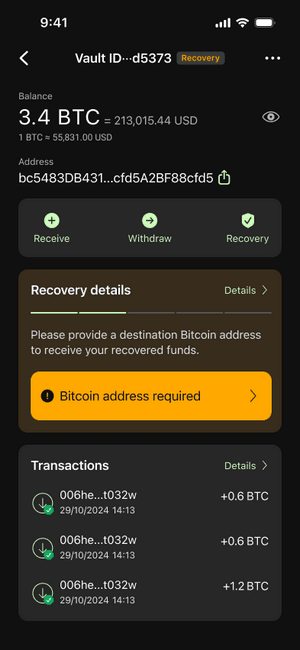
5.When you receive the transaction request, sign the transaction.
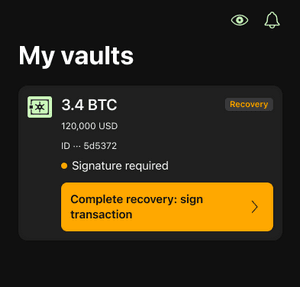
6.Then a mandatory seven-day security delay applies. During this period, Debifi does not immediately use its backup key to complete the recovery transaction.
The waiting period adds an extra layer of protection against unauthorized recovery requests.
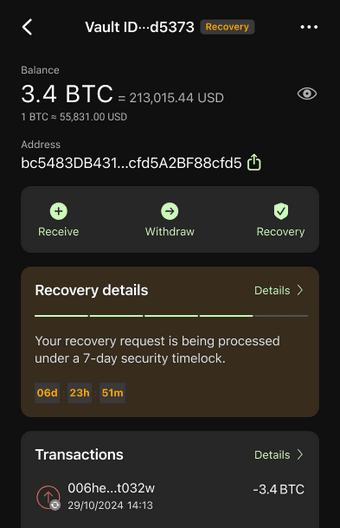
7.After the seven-day security delay, Debifi uses its backup key to help complete the recovery transaction. Together with your remaining app key, it provides the two keys required by the 2-of-3 vault setup to complete the transaction. Your BTC is then transferred from your old vault to the new BTC address.
8.Once the recovery is complete, your old Debifi Vault will be closed.
So, you can recover your bitcoin if you have lost the hardware wallet with one of the keys.
What if I lost both my hardware wallet and my phone?
A Debifi Vault requires any two of its three keys to authorize transactions. If both your hardware wallet and your phone are lost, you may no longer have access to 2 of the 3 keys. This means that recovery will not be possible.
What if I find my hardware wallet later?
Nice that you have found it. If you already have went through the recovery process and your funds were transferred to another BTC address, your old Debifi Vault was closed after successful recovery of your funds.
What if someone has my lost hardware wallet?
If you suspect that someone may have access to one of your keys stored on your hardware wallet, keep in mind that your hardware wallet alone is not enough to authorize a transaction because Debifi Vault needs 2-of-3 keys to authorize the transaction. Contact Debifi support as soon as possible and keep your remaining key and recovery information secure.